Dev Build
To use custom user plugins or test new features, you can point Equibop to a local development build of Equicord.
Prerequisites
Section titled “Prerequisites”Before configuring Equibop, you must have a local version of Equicord built on your system.
-
Build Equicord from Source: Follow the official Building from Source guide to clone the repository and install dependencies.
-
Add User Plugins: If you want to use custom plugins, place them in the
src/userpluginsfolder as described in the Installing User Plugins guide.
Configuring Equibop
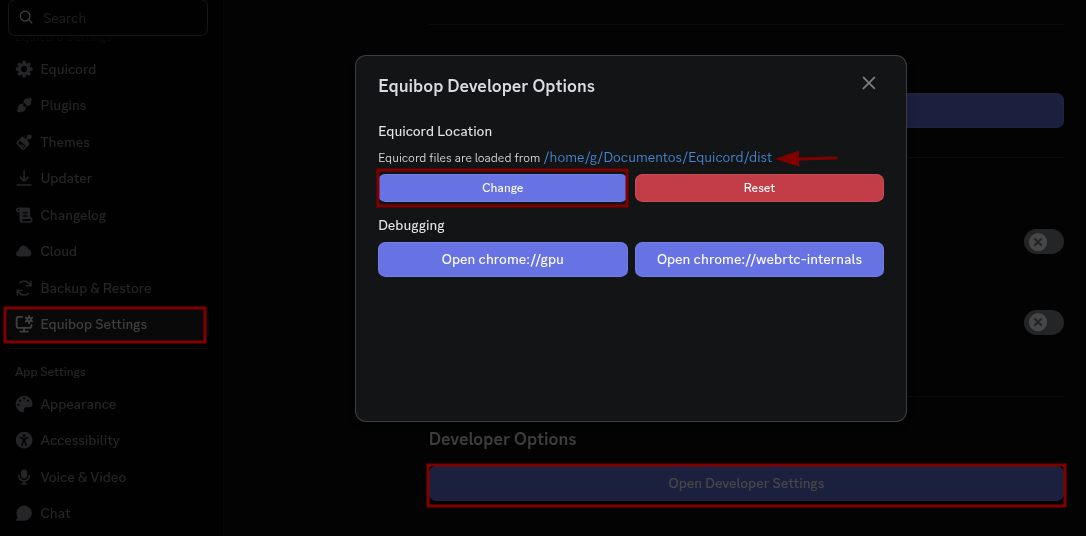
Section titled “Configuring Equibop”Once your local build is ready, you need to tell Equibop where to find it:
- Open Equibop Settings.
- Navigate to Developer Settings.
- Find Equicord Location and click Change.
- Navigate to the folder where you cloned Equicord and select the
distfolder inside it.